Sunday, October 26, 2014

Internet of Things Hackday Trip Report

Last week I attended the Internet-of-Things Hackfest at Minnetronix is the Twin Cities.


Dan McCreary working with a student on the Moving Rainbow Arduino Kit


Here is a quick summary of some of the things I learned last week:
  1. Students LOVED the new Moving Rainbow kits I built.  Although some designs worked better than others.
  2. The spark.io device is wonderful but still lacks some features that would make it easy for students to use in classrooms.
  3. Getting IoT remote devices  to work requires specialized skills (like C parsers) that many of us don't have.
  4. When students get their own ideas for projects they get laser focus
  5. Hackdays are a lot of fun!  They are great ways to meet people and learn from others.

I had two roles at the hackfest.  I helped setup and run the "Kids Room" for the hackfest and I did a (very) little work in the Lumière lighting team.

For the Lumière team I mostly helped a few people to learn how to solder wires the LED strips and use heat shrink to secure the wires.  The other two guys on my team (Daniel Feldman and Alan) had much better programming skills and experience with other platforms like the Raspberry Pi.

I did spend many hours working on building an XForms, REST, XQuery application for the spark.io.  And although I did get it working (video), it still needs a lot of polish to allow the commands to be flexible.  I also did get a few new patterns working:
  1. Larson Scanner (Cylon)
  2. Random colors
  3. Candle flicker (simulate the light flickering pattern of real candles)
  4. Up-down patterns
  5. Swipe (redraw colors one pixel at a time)
Many of these still need to be parameterized with arguments such as color and speed.  However doing a general interface still needs work.

To get the Internet-of-Things (IoT) moving rainbow kits to work we need to send a specific "change color pattern" command to each device.  Since the spark.io interface only accepts a simple string, we need to parse the strings into a pattern of colors and motion.  However none of use knew how to use the strtok_r() function so we struggled a bit.  Daniel did a great job under pressure getting one command parser working on the spark.io, however we will need to refine it a bit more over time.

The ideal long-term solution is to develop a small "Addressable LED Strip Markup Language" as a domain-specific command language and write a parser for it in C that would run on the Spark.io.  This is a non-trivial problem for people that don't write C every day.  However I hope to spend some time thinking about the pattern name, color name, delay period syntax and perhaps coming up with a small BNF grammar.

Moving Rainbow Findings

Now I want to review some of the findings around a low-cost Arduino kits for students.


One of the dongle-style Moving Rainbow designs connected to an FTDI programmer

My primary interest is to understand what can we do to get students involved in STEM and to keep them on the strong math and science tracks in high-school and college.  Each time I engage with students I look for things that get them excited and want them to return for more.

My vision is to help design low costs kits that students could take home and show their friends.  These kits should be inexpensive enough that schools, libraries, and park buildings could have them for checkout, just like any library book.  Imagine a bookshelf at the library that contained 100 different electronic kits, each with specific learning goals in mind.

My experience has shown me that with some mentoring and some good electronics kits that many students can use internet resources to do a lot of work on their own.  However some students need a bit more encouragement then others.

This was one of the first times I had my newest collection of my "Moving Rainbow" kits on display.  When the students came into the room I encouraged them to pick up each kit and play with them.  Each of them has slightly different designs, packaging and switches.  When they flick the power switch on the 12-segment RGB LED lights came on and some of the kits had nobs and sensors that change the LED patterns displayed.  I tried to pay special attention to each of the students and they came into the room.  I noted what kits they picked up and what features they were interested in.

One of the things I learned is that there was little interest in the small-versions of the kits.  These were the ones that did not have room for the 12 pixels within the box.  These had a "dongle" design where the LED strip was sticking outside the boxes.  These designs pretty much failed, and looking back I can see why.  My reason to try them was that the smaller boxes were less expensive.  The larger boxes cost $5 or $6.  However, one of the students wanted to purchase the "dongle" designs.

The other thing to remember is that the logistics of getting the Arduino drivers working on both Windows and Apple systems is very time consuming.  Much of the first hour was getting the Arduino drivers working and the FTDI drivers (required for the mini-pros)  installed.

Several of the students did a "color wheel" lab where they had to mix the red, green and blue values together to make purple, yellow and orange colors appear on the LED strip.  The look on their faces when the strip turned either the right or wrong colors was priceless.  These were fantastic teaching moments!  On my TODO list is a "cheat sheet" for the color functions with pictures of color wheels.  This guide would start with functions to set a pixel to a specific RGB value and draw colors within for loops.

The moving color labs was a bit harder.  I need to continue to find good simple examples of lights moving up and down and get them pre-installed in the Arduino Examples area.  This is a great way to teach for loops and if/then/else logic.  As my sister and brother have told me, teacher prep makes a huge difference in students understand and lowering frustration levels.

One incident was that the students really loved the idea of creating a small wearable designs.  I had my "Altoids" example necklace as a demo to show them.  A few of them wanted to make Halloween costumes out of them.  And they were VERY motivated once they realized they could create their own costumes out of them.  At our final presentation to the entire group, two of them came to the front of the group to show their creations.  One of the students specifically thanked me in front of the entire group.  I wish all the students were this polite!

One idea is to have a "Arduino wearables" hackday around the same time next year.  This would require a lot of planning and some volunteer work by people with sewing machines.

What this taught me was that once students get their own idea of a creation it is like a fire-bolt of energy gets lit in them.  Their distractions disappear and they become laser focused on their task.  They seek whatever resources they can get to reach their goals.  Helping each student find their project is what these hackfests is all about!

I also met a few other people that might help us lower the costs of the packaging and find lower costs of the Moving Rainbow kits.  I still have more work to do to learn about placing larger quality orders for components and packaging on volume discount sites such as alibaba.com.

I want to reach out and thank everyone that made the meetup possible.  The sponsors and the people at Minnetronix should get a special thanks!


Monday, October 13, 2014

Motors for Arduino Labs

This week I went through many of the SparkFun Inventor's Kits that we use in our CoderDojo Arduino labs and realized that the kids have been loving our little DC mini-motors to death.  As you can see in Figure 1 over half of the wires had broken off!

Figure 1: DC Motors with most connector broken off


The ones supplied in the SparkFun Inventors kits have small delicate wires on them that break off easily. Since the motor circuit lab is a popular lab we need reliable DC motors!

It was pretty easy to solder the wires back on.  However, I wanted to make sure they didn't get pulled off again.  So I have replaced the old thin wires with some thinker 22 gauge stranded wire. I then use heat shrink and some cable ties to bind the wires to the case of the motors. You can see the heat shrink just before I applied the heat in Figure 2.

Figure 2: DC motors with heat shrink

Next I used some small cable ties (see Figure 3) to firmly secure the wires to the motors.  So if the kids pick up the motor by the wires it will not strain the solder joints.


Figure 3: DC with cable tie


Viewing Motor Direction (Optional)


I also realized that some of the motors don't have gears on them so it is difficult to tell what direction they are spinning.  In our labs (not in the Sparkfun Inventors Kit) we need to show both clockwise and counterclockwise directions in the labs. The direction of rotation is used in the motor labs that use the motor driver H-bridge chips like the popular L293D. So I have added a small drop of hot-glue on the end of the motor spindle and then added a Golden Spiral sticker to help the students see the direction of rotation. I also put a ring of hot-blue around the base and then used a felt pad so that the motor could stand upright.

Figure 4: Motor on base with Golden Spiral label on motor spindle.  The wires are multi-stranded 22 gauge but have a 1/2 inch solid gage at each end to work with the breadboard.


Figure 5 has the artwork from the Golden Spiral Label. This is one of may favorite designs.
Figure 5: Golden Spiral Label to indicate rotation


As an aside, some of you may know that spirals are painted on jet engines like in Figure 6 to indicate that the engine is rotating and give the viewer some indication of direction.

Figure 6: Golden Spiral Graphic painted on jet engine to show motion

A discussion of the golden spiral is also a change to discuss the beauty of mathematics. A PDF file that can be used print out the designs on sheet of labels is here. Let me know if you want the source PPT file. I am not artist and others might have a better spiral design. An SVG image might be a bit smoother.

So some of you might be thinking that this is a lot of detail for a just one lab! You would be right! However, I think that the care and attention to detail we give each of these labs help the kids get quickly to the next level. This principal helps us apply the theory of Constructivism to our labs. Once kids know they can change motor direction directly from within their Arduino code they can then make the logical next step to seeing how they can turn a robot car direction by having one wheel motor go backwards. Each of these are small logical learning steps we need to keep kids coming back to our STEM classes.

In a busy noisy class with 20 students jumping around we don't want to have to search through 20 kits looking for a motor that has the wires attached. This takes time away from our learning objectives.

With a good solid supply of motors that will last through a year of labs like in Figure 7 you will be ready to help all your students get to the really fun parts - building their own Arduino powered robot!

Figure 7: Motors ready for the kids!

We will hear more about this and the learning steps to building robots in future blog posts.

References


Thursday, October 09, 2014

Spark.io Core Evaluation

Last week at the Minnesota Arduino meeting I met the team from Spark.io.  They make a low cost (under $15 in quantity) device that you can program like an Arduino, but it has a full WiFi stack running on it and works with an optional cloud-based service.  They gave me (free) a device to evaluate.  So here is a first look.


The device came in a small box with a half breadboard and a USB connector.  You plug it in and it starts flashing a color that indicates it is "listening for a WiFi login".  If I had a smartphone it would have been easy to give it my WiFi ssid and password, however I did figure out how to give it the credentials using a Windows serial port (putty).  The serial port is not a full unix-like shell, but it got the job done.


Once it got on the local WiFi I went to the spark.io web site and "claimed" my device by putting in its device ID (which I also got via the Windows serial interface).  I could then use a web-based IDE to download the standard Arduino "Blink" app.  I also found the NeoPixel library and ported over some of my Moving Rainbow demos. Here is the spark core running one of the rainbow patterns:


It is interesting to note that you can't use many Arduino Libraries alone.  Someone needs to port them.  However I think that most of the common libraries that students would need are there.


What I really liked about the device is that the cloud interface give each device a REST interface.  For example if I put the following into my browser (or use the UNIX curl), I can get my device status:


We can get the status of our device in a JSON format:


[
 {
   "id": "1234...",
   "name": "dan-test-1",
   "last_app": null,
   "last_heard": "2014-10-10T04:19:08.528Z",
   "connected": true
 }
]


If you have a smartphone there is a nice app you can use to setup the spark core (wifi and password) and do some basic programming.  However I also want to make sure that I can figure out how to make the spark core work in a teaching setting similar to the CoderDojo meetings.  This is where kids come in with Windows PCs and hook up the Arduino to the USB and fire up the Arduino IDE.  I also think that schools may purchase Chromebooks that they also want to use in the labs.  So I still have a bit more learning to do to see if I can create a full Internet-of-things lab that kids with a low-cost Windows PC can really use.


I like the fact that the spark.io system seems pretty open and all the code is on github.  The ARM processor also is a LOT more powerful than the Arduino controller.  The cost is also very low when you consider that a WiFi Arduino shield alone is $90 which is 3x more expensive than the entire device.  The spark.io Internet of Things "starter kit" is currently $39.00.  They have another version with many sensors for $99.00 which seems like a good deal.


My initial impressions are that if you have a Linux or Mac and can run node.js from the command line that you should have very few problems.  That is clearly their target developer audience. However many kids don't have access to a smartphone and a $1,000 Mac.  However, having a low cost Windows computer and using an simple Eclipse-like IDE is still something I hope we can have in the future.


I have started to create a simple web-front end and have some basic unit tests running.  I am using Bootstrap 3 and eXist (my favorite NoSQL database) with a few simple XQuery functions to build the URLs. My initial tests allow you to store the device ID and Access codes in a config file and I have a set of functions that convert the JSON responses into pretty HTML pages.  Next I want to be able to change the colors and light patterns using a web form.  I hope that I have something to demo for the Luminarie team at the hackfest a week from Saturday!

Overall rating 5 out of 5 stars!

Saturday, August 30, 2014

New Arduino Moving Rainbow Lab for Kids for Under $10

After participating as a mentor in the local Twin Cities CoderDojo  in Minneapolis at the University of Minnesota I found that there are two things that kids love: motion and color.  My prior experience with kids is that they love to take projects home with them to show their friends.  So here is the question - could we design an Arduino kit that kids could come to Maker events and actually take a working project home that has both color and motion?

At our local CoderDojo we wisely use the SparkFun Inventor's Kit.  If you have not seen this I encourage you to take a look.  Lots of nice components and a great guide (PDF). Many people undervalue the amount of work going into the guides for these kits.  Good writing is hard to find, are rarely included in many lower-cost projects.  However, since the cost of full Inventors Kit is still around $100 (without shipping) it is beyond the budget of most Maker events to let kids take these home.  So here is my answer: lets find a way to use the low-cost Arduino Compatible Pro Mini combined with a short strip of addressable LEDs in a kit that we could sell for around $10.

Here is a picture of my initial design:


Arduino Moving Rainbow Kit

I think this kit is perfect for kids since we have the wonderful colors of these amazing individually addressable LEDs as well as the ability to create "motion" by programs such as running lights.  The total cost of this should be around $10, depending on the options we use.

Now lets go through the components to verify that we can do this in the $10 price range.

Here is a place on eBay that sells the Pro Mini Arduino Compatible for around $2.00. Although I suspect that we could get them in quantity for less.  Note that these do not have a USB port on them.  More about that later.

Here is an addressable LED strip with 60 LEDs that we can find on eBay for around $17.00. You can cut these up into 6 strips of 10 LEDs each which gives you a price per kit of around $2.80. What is wonderful about these LED strips is that they only take two power pins and a single data pin to hook up!  I use the standard WS2811B which you can program with many libraries.  I have some sample code on github that uses the Adafruit NeoPixel libraries, however I have found other libraries work well also.  Keeping wiring simple is important for kids that don't yet have the fine motor skills (and patience) to wire up complex projects.

Now the last two components are the mini soderless breadboad (around $.70 in quantity), a switch and a power source.  In the kit in the photo above I am using a 3.7volt Lithium Poly battery taken from an old RC helicopter that no longer works. We could also use an external 3 AA or AAA battery holder for around $1.

I also added a power switch and a clear plastic polystyrene box I purchased at the Container Store, although a small plastic leftover box will also work well.

Arduino Pro Mini Rainbow Kit Parts List
  1. Arduino Compatible Pro Mini $2.00
  2. 10 element LED strip $2.70
  3. Solderless mini breadboard $0.80
  4. Battery holder $0.70
  5. Plastic Polystyrene Box $2.50
  6. Wire $.50
  7. On-off switch $1.00
Total: $11.40 (with 3 AA batteries)  I have a detailed parts list here

I also suspect that if we purchase these in quantities of 20 or more the prices would come down a bit and we could get in under $10.

The biggest challenge is that each station must be equipped with a laptop with a FTDI basic breakout programmer with the Arduino software pre-loaded. The Arduino Uno (which runs about $25) does not need the FTDI programmer, but would be 10x more expensive for each Rainbow kit.  Getting these setup and configured is not easy.

I should also acknowledge that when we purchase items off of eBay or other sources, we are not using the official mini supplied by the fine people at Arduino.  However at over $20 these devices would not fit into our under $10 budget.  I still think that for other projects we should encourage people to use original Arduino hardware since the costs go to promote further open Arduino projects and quality educational materials.

Let me know your thoughts on this.  Getting high-quality clear plastic boxes that kids could take home, throw in their back and show their friends is still something I am working on.  I found one source here that I might try but any suggestions you have would be great.  I know other projects use simple baggies for their parts but these seem hard to use and show to others.

There are also other options is to provide a "night light" mode that you could plug into a wall outlet and not have to use batteries.  I have seen 5v USB "wall warts" for under $1.

Although I know that this is a very small project to get kids started in Arduino, I think it might be the platform that other projects could be added.  Creating a clock (12 LEDs required), putting sensors on to display temperature or adding accelerometers and magnetometers might be the next step for these kids.  The key is that they could take them home and show their friends and that keeps them interested and motivate to continue their work.

I also want to thank Gerd Knops for helping me get started on using the LED strips.  He is a brilliant engineer, a great friend and wonderful mentor to me.  I hope that what I learn from Gerd I can use to get more kids interested in science, technology, engineering and math.  We don't really have much time left to do this.

Wednesday, October 02, 2013

Agile Transformation in the Post NoSQL Era

Over the past four years we have seen the NoSQL movement grow from a small "Meetup" in the Bay Area to a technology that is touching all corners of the database world.  Each year NoSQL software becomes more capable, lower cost and easier to use. Document stores, in particular, make the process of doing object-relational mapping unnecessary allowing anyone with god metadata (JSON and XML) to simply drag-and-drop their files into a centralized corporate data store.  There are still a few challenges left.  For example using statistical analysis of inserts and record counts to optimized indexes and putting good query languages (like JSONiq) on top of these data stores.  But in large, these features are just polish on systems that are optimized to scale and be highly-available.  The hard work seems like it has been done and we are now in the stage of refinement, not revolution.

We documented the emergence of the NoSQL database patterns in our book, Making Sense of NoSQL, which now available through Manning Publications.  If you read this book you know that NoSQL systems have a diverse set of architectural patterns and different patterns apply to different problems.  Selecting the right database architecture is a complex process of carefully understanding the subtleties of requirements and weighing the alternatives.  Yet they do work well and once they are setup and configured they make data persistence a straightforward process.

So whats next?

Now that saving data has shifted from a project in its own to a smaller part of the application developer project we see the skills needed to build applications starting to shift.  The need to model your data with ER modeling tools is getting less.  The need to write complex joins with SQL is no longer needed.  The next major skill set we would like to address is the the movement to agile transformation.  How do you get you data out of your database and how do you transform it into the many formats that your application needs?

We think that the answer to this question is clear.  Organizations need to be better at transforming the data in their database to other forms.  This is the shift in skill sets from persistence centric to transformation centric.  And it is not just the software developers that need to be able to transform data.  Everyone on your team including non-programmers can play a role.  They all need skills to quickly transform data from one form to another.

We call this shift the movement to toward Agile Transformation.  We hope to document how organizations are waking up to this new movement and understand the tools and processes they are adopting to empower everyone on their team to quickly transform data.

This process of data extraction and transformation used to be a two-step process.  SQL developers might create a series of tabular reports.  These reports were then converted into the medium needed, HTML, XML, JSON, or even CSV files and other structures needed by other tools.  Now the extract and transformation process can be done with a single step.  Query results are no longer restricted to tabular formats.

Strategies for Agile Transformation

Over the next few months (or perhaps years), we hope to document many of the ways that organizations are attacking the agility challenges.  Here are just a few strategies to get us started.

Single Source Canonical Data Models
If you are in the content management business you know that the concept of single-source publishing is central to your productivity.  Using a single format to store content gets around the many-to-many transform problems that can drag down a teams productivity.  We see the same principals also applying to web applications in general.  Getting many data sources into a single format and then transforming this single format into many forms is the key to organizational productivity.  We call these models "Canonical" since they are the standards that organization can build publish/subscribe web services around.

Flexible Query Languages
If you have every worked with tools like XQuery and JSONiq you know that they are the most flexible query languages around.  These languages have benefited from years of work combining the best features of SQL, XSLT, XPath and dozens of other advanced query languages into a grammar that is designed to transform a variety of use cases.

Reusable Transformation Libraries
One of the first strategies that companies find is that many transformations are similar and can benefit from reusable code.  Languages like SQL do offer a wide variety of non-portable stored procedures.  Yet most of these languages limit your ability to build reusable transformation functions and modules.  Modern languages need to be close enough to your data to understand how queries use indexes but abstract enough to be reused in new applications.

Using Great Tools: IDEs and Report Writers
SQL GUI Report Writers were one of the first tools that tool the complexity out of transforming tabular data.  And we need more tools like these to make NoSQL reporting accessible to non-programmers.  Some NoSQL products like HBASE already have SQL-like query tools.  From our other blog posts you may know that we are big fans of the the oXygen IDE for managing JSON and XML data.  oXygen makes the process of learning how to write XPath expressions easy for even the non-programmer.  Even if their data is complex.  These tools are complex in themselves and require hands-on training if non-programmers are going to get the most out of them.

Simplicity for Non-Programmers
One of the core foundations of agility is not have all your transformation be controlled by a small group of overworked developers.  We learned that simple tools like GUI-based report writers or simple XPath templates can empower a non-programmer, with a bit of training, to build and maintain their own data transformations.  Not needing to understand database joins is a big step in empowerment.  Getting a good foundation library is another great step.  Setting up small but easy to use templates is another good strategy.  Building a search system to find the right library and templates also helps empower new staff and lowers the training burden on existing staff.  In general, we feel that if a user "knows their data" that they should be given the tools to transform their data.

So what is the best practices to build an organization that has agile transformation competency? We would love to know your ideas.  Please send us email or tweet us at @dmccreary on Twitter.

Monday, July 01, 2013

Rounding error in Java when converting strings to doubles

I came across a rounding error when I was running an XQuery.

Here is the error:

xquery version "1.0";
number(3.1) + number(3.2)

which returned:

        6.300000000000001

Not the expected value of 6.3.  Note that the XQuery function number() returns double precision data.

After a note from Eric Bruchez he suggested I cast the numbers to decimal:

xquery version "1.0";
xs:decimal(3.1) + xs:decimal(3.2)

and the problem seems to go away.  He also showed that he could reproduce this error in other Java JVM languages like Scala.

Let me know if anyone else has seen this problem before and has any other suggestions for a fix.

Thanks! - Dan

Tuesday, May 14, 2013

Analytical Reports for Technical Books

We are wrapping up our work on our book "Makings Sense of NoSQL" and I have created a series of XQuery reports on our book that we have found useful.

Our book is stored in XML DocBook format, which for those of you that have not used it, is ideal for technical books. DocBook contains elements for almost everything you need in a technical book including chapters, sections, paragraphs, figures, glossary terms, bibliographic references, and index terms. In short DocBook is is the perfect fit for most technical books and it can easily be extended. One key aspect about DocBook is that it is easy to transform into multiple formats such as HTML, PDF or ePub. There are many open source transforms available for DocBook. DocBook is at the heart of the movement into single-source publishing for technical publications.

In additional to the standard DocBook transforms we also created a series of reports on the book and I thought they might be of interested to others.  Here is a summary of some of these reports.

Chapter length report

When we started writing our book our goal was to produce a 310 page book with 12 chapters, each with approximately equal length.  But logically we wanted our fist chapter to be a brief overview and we found that the chapter that described the core NoSQL patterns had more content.

This is a horizontal bar chart that shows the length of each chapter. The goal is that all chapters be roughly the same size in length.
Chapter Length Report

You can see that one chapter in our book (chapter 4)  is a bit longer then the rest of the chapters.  We knew this up front after running this report and were prepared to defined our decisions with our editors.

The "Naughty words" report

We quickly found out that editors have some words that they don't want to see in a technical book. Words such as "just" or "very" should be used with great caution. There were also words that were not allowed "vs.", "e.g.", "etc.") according to the style guide.  This report shows you how often you use these words in each chapter.
Report counting specific words in each chapter

Book metrics report

This is just a raw counts of elements such as book parts, chapters, sections, figures and tables etc.
Book Metrics Report

Chapter metrics report

For each chapter I created a detailed report of the content. As you are writing each chapter, other people can view your progress by running this report.  I tend to put in outlines first, then figures and then the actual text of each chapter.

List of figures and tables by chapter

These reports shows a listing of figures and tables sorted by chapter and location in each chapter. It also shows the caption for each figure and a thumbnail of the image. There are versions that show the type of figure (line-art vs. bitmapped) the sources of each figure.
List of Figures Report

Figure and table captions reports

Editors want to make sure a book is "browsable" which means that every other page has an interesting figure that people will see when they flip through the book.  Each of these reports can list the length of the figures and table captions sorted by the length of the caption.  The captions that are too short will need further work.

Paragraph and sentence length histogram reports

There are guidelines that should be used when writing technical books on sentence and paragraph length. This report shows the distribution of paragraph lengths in each chapter. You should work with your editor to find reasonable guidelines for your audience.

Paragraph Size Distribution Report

Table of contents reports

For reviewing the book structure it is always nice to have reports that list the book's structure by chapter, section, sub-section and sub-sub-section. These reports come with several parameters that limit the depth of the table of content and can also be modified to create mind maps using open source mind mapping tools.

Table of contents showing Parts, Chapters, Section 1 and Section 2

Once I wrote the basic structure of the table-of-contents report it was easy to create other output formats for different functions.  Here is an example of a GraphViz output.

Book Outline using GraphViz format.

This example used the DOTML markup format and an external transform using the Chris Wallace graphviz XQuery module.

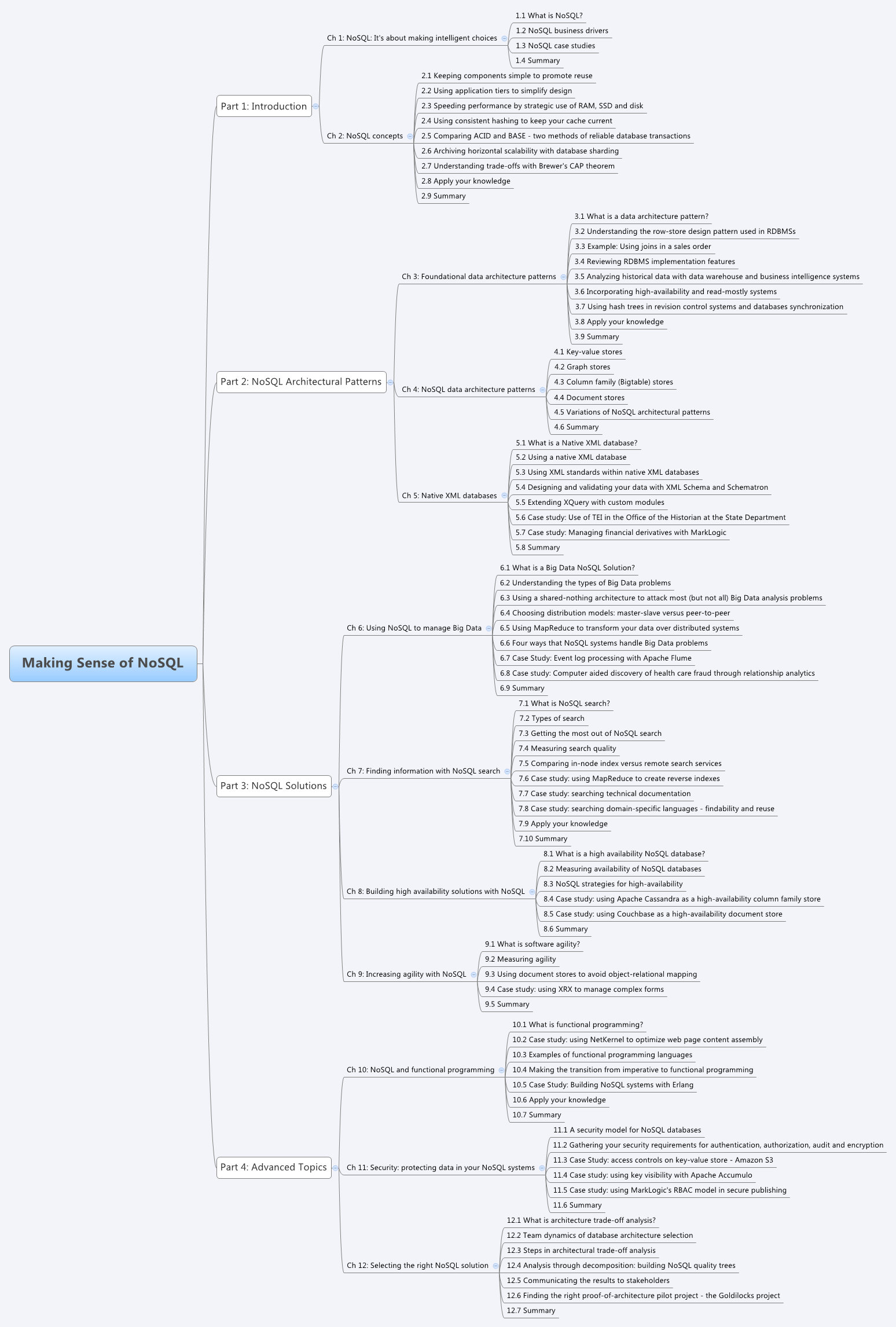
You can also convert the table of contents into an Mindmap file and open the file in FreeMind or XMind.

Here is an example of the book rendered in XMind.  NoSQL Book MindMap

Glossary of terms reports

Our book puts a focus on the terminology used in the NoSQL movement. We try to create precise definitions of all the terms we use and discuss the variations in definitions in different NoSQL communities.  I use these reports to list each time a term is first introduced and make sure that we have a formal definition in the Glossary Appendix at the end of the book.

Glossary Term Report Showing Glossterm IDs and Definition Status

There are also other miscellaneous reports listing the introductory chapter quotes, lists of comments by reviewer (extracted from PDF using Apache Tika), and various tools to help us gauge the completeness of each chapter.

Report Strategy

We created a central XQuery book module that had all the common functions such as $book:chapters, or  that returned a sequence of all book chapters or book:word-count($node) that returned a word count of a node.  I used the eXist-db database to store and execute the transforms.  After we created the module the templates could be quickly customized for each report.  We also used the oXygen XML IDE extensively and we want to thank George Bina for his support of our project.

I think that DocBook, oXygen, XQuery and eXist are ideal tools for managing the book creation process.

Monday, May 06, 2013

Cognitive Bias in NoSQL System Selection


After attending the Saturn 2013 Conference I was exposed to the use of "Cognitive Bias" in software architecture.

Here are some examples of cognitive bias I have seen as applied to the world of NoSQL database selection.

Anchoring bias - the tendency to produce an estimate near a cue amount - "Our managers were expecting an RDBMS solution so that’s what we gave them."

Availability heuristic - the tendency to estimate that what is easily remembered is more likely than that which is not. - "I hear that NoSQL does not support ACID." or "I hear that XML is verbose?"

Bandwagon effect - the tendency to do or believe what others do or believe - "Everyone else at this company and in our local area uses RDBMSs."

Confirmation bias - the tendency to seek out only that information that supports one's preconceptions – "We only read posts from the Oracle|Microsoft|IBM groups."

Framing effect - the tendency to react to how information is framed, beyond its factual content "We know of some NoSQL projects that failed."

Gambler's fallacy (aka sunk cost bias) the failure to reset one's expectations based on one's current situation – "We already paid for our Oracle|Microsoft|IBM license so why spend more money?"

Hindsight bias - the tendency to assess one's previous decisions as more efficacious than they were – "Our last five systems worked on RDBMS solutions".

Halo effect - the tendency to attribute unverified capabilities in a person based on an observed capability. – "Oracle|Microsoft|IBM sells billions of dollars of licenses each year, how could so many people be wrong". 

Representativeness heuristic - the tendency to judge something as belonging to a class based on a few salient characteristics  - "Our accounting systems work on RDBMS so why not our product search?"

Thanks to everyone at CMU/SEI and the SATURN Conference for the exposure to these ideas.

Wednesday, May 01, 2013

How to pass oXygen XML IDE Editor variables into an XQuery script.

I am a big fan of the oXygen XML Integrated Development Environment.  It has many powerful features and I learn about new ones the more I use it.  I recently started a project that required me to run XQuery transform on hard-drive files using Saxon HE.  Since I normally run XQuery from within the eXist-db this was a new challenge for me.

I have many XML files and many different XQueries and I wanted to run them directly from test cases in an oXygen project.  But unlike XSLT, XQuery does not have a concept of "standard input".  You need to specify a path to the document within the XQuery file itself.  So how to pass the file name from the project directly to Saxon?  Luckily, the guys from Syncro Soft (the authors of oXygen) thought about this.  You can use oXygen "Editor Variables" to be parameters to your XQuery.

Here is a sample program that reads two external variables, one for the project director and one for the current file name (with extension).

XQuery Program

xquery version "1.0";

(: Example of how to access external "Editor Variable" variables passed
  by oXygen. This one example gets us to a full file path within a
  project.  See:

http://www.oxygenxml.com/doc/ug-editor/topics/editor-variables.html 

  for other editor variables.
:)

(: oXygen project directory :)
declare variable $pd as xs:string external;

(: file name with extension :)
declare variable $cfne as xs:string external;

(: note the triple forward slashes before the file. :)
let $path := concat('file:///', $pd, '\', $cfne)

return
<results>
   <project-dir>{$pd}</project-dir>
   <file-name>{$cfne}</file-name>
   <file-path>{$path}</file-path>
   <doc-available>{doc-available($path)}</doc-available>
</results>

Note that we put the project and file together to get the path to the file and use the doc-available() function to verify that the file is there.

Next, we set up a transformation scenario and put the file above in the transform URL.  We have to add the parameters to the transform.  oXygen parses your XQuery for all external variables and puts them in each line for you.  For each variable put in the same variable with the ${pd} notation where the dollar sign is outside the curly braces (opposite of XQuery).

Here is a screen image of these parameters and their values.


Results

When we run this transform on any file on Windows we get the following:

<results>
   <project-dir>D:\ws\project\subdir</project-dir>
   <file-name>my-input-file.xml</file-name>
   <file-path>file:///D:\ws\project\subdir\my-input-file.xml</file-path>
   <doc-available>true</doc-available>
</results>

On Mac and UNIX systems we would not use the file:/// prefix and the separators will be forward slashes.

Friday, August 17, 2012

NoSQL book now available in MEAP

The book that Ann Kelly (my wife) and I have been working on for the last year is now available on the Manning Early Access Program (MEAP). Here is the link:

http://manning.com/mccreary

The final title of the book will be:

Making Sense of NoSQL: A guide for managers and the rest of us

You can download chapter 1 for free but to get the other three chapters you will need to be part of the MEAP program which is priced at $23.99 for the Ebook only and $29.99 if you would also like a printed copy sent to you when the book is done.

We are looking for reviewers of the book. We are especially interested in finding anyone that has an interest in how to explain NoSQL concepts to non-programmers. This includes Managers, Project Managers, Business Analysts and anyone else that is interested in using NoSQL.

I believe this this is one of the first NoSQL books that is targeting managers and other non-programmers. In order to write to a general audience we are trying to use extensive tables and annotated graphics to make a highly readable book that give people an overall understanding of the NoSQL movement. Much of these tools have been developed by Ann and myself over the last several years trying to explain NoSQL concepts as part of our consulting business.

If you know of good NoSQL metaphors or even NoSQL jokes that we can include in the book please let us know! We will be very involved in the Manning Author feedback program.

Friday, September 30, 2011

AnyChart Case Study

I just released a case study (click on the blog post title or click here) using the commercial software charting package called "AnyChart". After using over a dozen charting solutions including Google Charts and FreeCharts I really feel that AnyChart has the best solution that really scales up.  Not only does AnyChart have a large number of charts but it is also very reasonably priced at around $500USD per server. Because I store all the chart specification and implementations in XML and I use eXist to manage the charts it is easy to manage the full lifecycle from requirements to testing all within a single Lucene-search powered environment.

The latest release of AnyChart also generates SVG and HTML5 compliant charts that run on the iPhone and iPad. This really shows how "declarative" systems are much more portable than any flash-based implementations.

If you are looking for an inexpensive but powerful tool for building charts and dashboards I would defiantly give them a try.

You can get samples at their web site at anychart.com

Saturday, September 24, 2011

The "Pathification" of NoSQL

In my consulting work I try to focus on the empowerment of the non-programmer to build and maintain their own web applications. This is not an easy task. There are many barriers, some political and some technical. But when a new Business Analysts or Project Manager can create their own metadata management tools and begin to tell others their story I have great job satisfaction.

My current best-practice is to teach non-programmers how to write XPath expressions into their data sets. I tell them that if they are committed to "knowing their data" that I can teach them how to write web-applications in a week or so. The trick is to give them a "template" CRUDS application (Create, Read, Update, Delete, Search) that they can just plug in their own XPath expressions to get the application to work. They don't need to know the thousands of features of XQuery and native XML databases, they just need to know their data, how to write some simple XPath expressions and where to put these expressions into the templates.

I call this process "Pathification", a word that is similar to "Simplification" and "Standardization" but it has a focus on only teaching a very small subset of the many possible tools and a focus on cross database standards like XPath. Once they feel confident they can create simple CRUDS applications in a few hours they are then highly motivated to continue learning XQuery, but on their own pace and balanced with their other job responsibilities like data governance and semantics.

Pathification is something that can happen because native XML database have many enabling technologies. They have WebDAV drivers that makes you database look like folders on your desktop. We have tools that automatically convert XML into HTML and XForms. We have subversion libraries that allow your form "save" to go directly into a version control system. And these tools continually get better and make it easier to empower novice users.

The NoSQL movement is a huge and diverse community. And many people have focused on areas such as scalability and the integration of different types of data into a single XML development environment. These are all great efforts and really move us in the right direction. But I think for us to make NoSQL into a true multi-vendor, multi-product development platform is to create more tools that empower the non-programmer. For people in the native XML world we have a great start. Standards like EXPath, new application packaging tools and XRX application repositories will continue to make it easier for non-programmers to reuse and share their applications.

What I would like to see (but I am not sure is possible) is both XML and JSON-centric system to start to come together and share their ideas on how to make this happen. Can JSON data-stores like MongoDB and CouchDB be "Pathified"? Can we create shared applications that work with both types of back-end systems?

If we do this right, I think the world will be a much better place. People will have more choices for managing both structured and semi-structured data and non-programmers will be able to take a spreadsheet or new data feed in a standard format and build a new web application that manages this data in just a few hours without having to depend on other programmers. I think of this as a system as easy to use as Microsoft Access(TM) but without the chaos: All data can be stored on centralized servers with REST service-oriented interfaces for every data set.

Please let me know your thoughts on these ideas.